Data Migration Is Not Just Bulk Copying — It’s About Architecture. What the Three-Layer Structure Absorbs

This article explains a practical three-layer approach to data migration for system replacement projects: legacy system exports, an absorption layer, and the production schema. We cover the role of the intermediate layer, two common migration patterns used in real projects, and a checklist to review before starting migration planning.
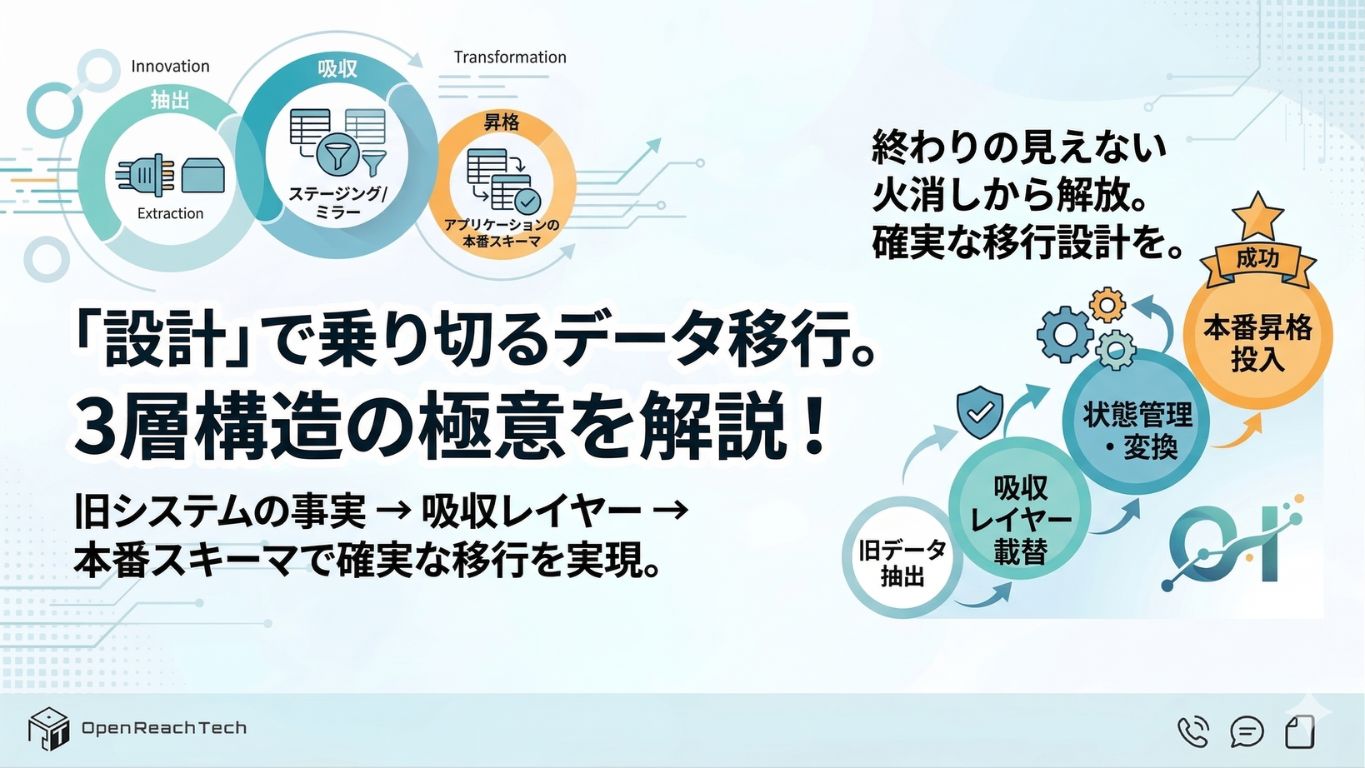
Overview
Introduction
Migrating data from an old system to a new one is a process where rework and inconsistencies frequently occur, making it an unavoidable challenge for many companies.
We organized the ideas and practices we have repeatedly used in actual projects in the hope that they will help companies considering system replacement or migration, as well as engineers involved in architecture and implementation decisions.
Overview of the Architecture Introduced in This Article
To summarize first: the most important point for smooth data migration is to separate the process into the following three layers:
- Extract data from the legacy system (file exports, bulk extraction, etc.)
- Store the data in an absorption layer such as staging tables or mirrors while preserving as much original information as possible
- Transform and load the data into the schema expected by the production application
Instead of injecting legacy data directly into the new application, introducing an absorption layer allows migration-specific processing, reconciliation, and legacy data quirks to be isolated within the intermediate layer.
This prevents exception handling from leaking into production code and tables, dramatically reducing migration-related fixes and testing effort.
In the following sections, we will explore this three-layer architecture in more detail and explain why it works effectively.
Why You Should Not Insert Data Directly into Production Tables
Many people initially imagine that data migration simply means exporting data from the old system and importing it into the new one.
However, real-world migration projects are rarely that simple.
Questions immediately arise, such as:
- How should production data consistency be guaranteed?
- Can the same procedure be repeated if the migration fails halfway?
- How should ambiguous data matching be handled?
- How can only differences be reprocessed?
- How much information should remain for future explanations and audits?
These concerns arrive all at once, which is why real-world data migration projects rarely end with a simple export-and-import process.
It is also common for systems that worked before migration to stop functioning correctly afterward. The larger the system, the longer it takes to identify and fix the root causes.
Some may wonder: “Why not skip the intermediate layer and insert everything directly into the new database?”
However, legacy systems contain data realities that only made sense within their original environments:
- Old column names
- Proprietary identifiers
- Informal rules known only by specific staff members
- Duplicate or missing data
These often do not align cleanly with the redesigned business data structure of the new system.
If you forcibly inject such data directly into the production application schema, exception handling and migration-specific branching logic begin spreading throughout the new system.
As a result, maintenance costs rise significantly every time migration needs to be rerun or partial data must be reimported.
To avoid this, we isolate complexity inside the absorption layer.
The absorption layer — typically implemented as intermediate tables — stores both:
- Facts originating from the legacy system
- Decisions made during the migration process
Only the final step before production follows the rules of the new system.
This makes validation, corrections, and retries easier while also helping new project members clearly understand where the “new system world” begins.
The Three-Layer Flow
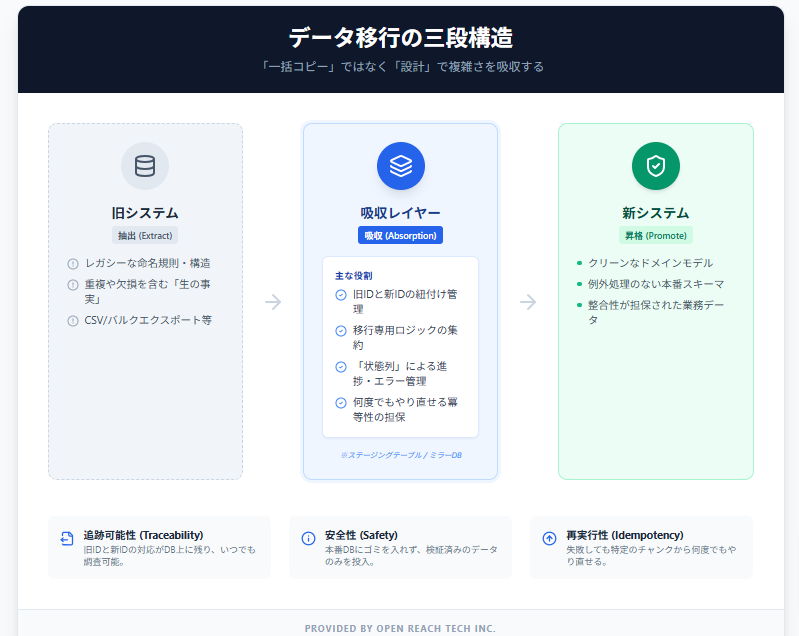
Specifically, migration proceeds through the following three steps:
- Extraction — Export data from the existing system through files, bulk exports, or similar methods.
- Absorption — Store the imported data in the intermediate absorption layer while preserving as much original information as possible.
- Promotion — Transfer data from the intermediate layer into production business tables according to mappings and business rules.
At Open Reach Tech, regardless of project-specific requirements, our principle is to always insert an intermediate layer between the legacy system and the production application.
This is not merely a convention — it is a design decision that helps avoid endless rework during long-running migration projects.
The overall flow looks like this:
Responsibilities of the Absorption Layer
What responsibilities should this intermediate layer have?
There are roughly four key roles it should fulfill.
- Preserving legacy representations — Keep snapshots, old IDs, and raw imported values exactly as they were during import. This becomes the foundation for audits, difference checks, and rollback operations.
- ID mapping and associations — Resolve relationships between old IDs and new IDs before loading data into production. Ambiguous states such as unmatched or multiply matched data should also be represented explicitly here.
- Centralizing migration-specific logic — All temporary migration logic, including normalization and chunk processing, should be isolated within this layer.
- Operational compatibility — Design the process to support repeated execution through techniques such as UPSERT operations based on natural keys and import batch tracking IDs.
Before moving data into production, it is also important to define “gates” such as:
Only rows meeting these conditions may proceed further.
For example, contract data may require:
- Customer IDs and start dates to be non-empty
- Product codes to exist in the product master list
- Department codes to exist in the organization master list
By loading all data into the absorption layer first, filtering, matching missing references, and other corrections can be handled there rather than leaking complicated conditional logic into application migration code.
Additionally, maintaining status columns such as:
- OK
- Needs Review
- Error Reason
makes migration error tracking significantly easier.
Teams can immediately see how many records are blocked and selectively retry rows with the same failure reason.
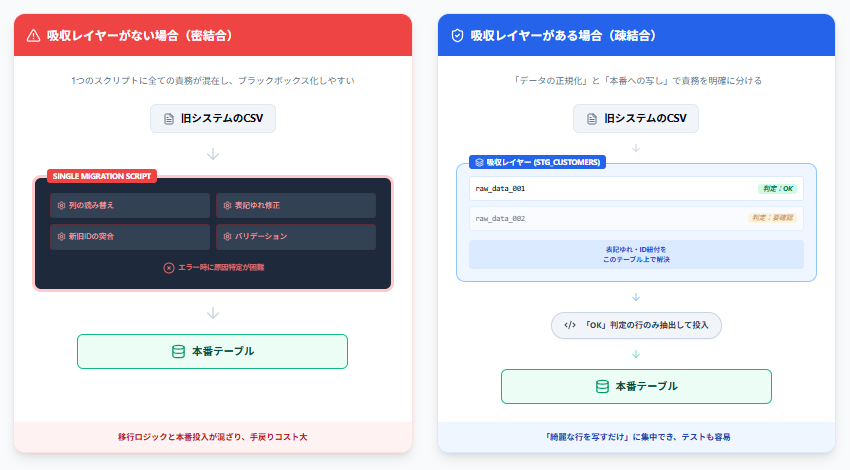
Example: How Responsibilities Differ with and without an Absorption Layer
Below is a simple comparison.
Without an Absorption Layer
A single migration script handles:
- Legacy CSV column translation
- Email normalization
- Customer ID reconciliation
- Empty field validation
and then directly inserts rows into the production customers table.
As a result, migration-specific logic and clean production-ready row generation become mixed together inside the same functions, making debugging difficult.
With an Absorption Layer
Data is first loaded exactly as exported into intermediate tables such as stg_customers.
Separate processes then:
- Normalize data
- Resolve ID mappings
- Determine import eligibility
The production loading process becomes almost entirely limited to:
Copying rows marked as “importable” from
stg_customersintocustomers
This cleanly separates:
- Code that handles legacy data quirks
- Code that writes clean production-formatted rows
making the migration easier to maintain even after completion.
Two Common Migration Patterns Seen in Real Projects
Below are two migration approaches frequently seen in real-world projects.
Pattern A: Load Multiple CSV Sources into a Unified Staging Format and Gradually Promote Them
This pattern is commonly used when multiple legacy systems produce CSV files with inconsistent formats.
The goal is to normalize all imported data into a unified CSV structure before processing.
For example:
- Customer data
- Subscription contract data
may first be loaded into staging tables.
Then:
- Email addresses are normalized
- Records are matched against production customers
- States such as “no match” or “multiple candidates” are stored in dedicated columns
Finally, only rows satisfying all predefined conditions are promoted to production.
Since problematic rows can be identified immediately through status columns, teams do not need to dig through large application logs.

Pattern B: Load Generic SaaS Exports into a Database Mirror and Transfer Them into Production Data
This method is often used when migrating from legacy SaaS CRMs.
In this approach:
- Exported data is loaded into mirror tables that resemble the structure of the old system
- Data is read incrementally in chunks
- A migration program (Migrator) transforms and transfers the data into production tables

Complex legacy-system-specific interpretations remain isolated within the mirror layer and Migrator logic, allowing production systems to receive only clean business-oriented data structures.
Differences Between the Two Patterns
Pattern A centers around staging tables with explicit status management.
Pattern B focuses on reproducing the legacy structure first and performing transformations programmatically.
Neither approach is universally correct.
What matters is deciding:
Which form of absorption layer best matches your company’s data characteristics and your team’s strengths.
Checklist for Successful Data Migration
If you are preparing for migration, reviewing the following points can help reduce risk.
- Never load legacy system data directly into production. Always insert a staging or mirror layer.
- Ensure the migration can be safely re-executed multiple times without breaking data consistency.
- Decide where and how old IDs, new IDs, and migration states will be tracked.
- Avoid relying solely on logs for troubleshooting. Error states and error types should be queryable directly from the database.
Conclusion
Successful migration depends not only on tools or temporary scripts, but also on architecture and operational design — especially:
- Where boundaries are drawn
- Whether the same process can be repeated reliably later
The concept of dividing migration into three layers sounds simple, but in real projects, many detailed decisions accumulate:
- How to represent ambiguous matches
- How to prevent retries from corrupting existing data
- How to preserve traceability
If these considerations are overlooked, migrations often lead to long-lasting rework and delayed discovery of inconsistencies.
At Open Reach Tech, we have supported projects by designing migration processes that remain repeatable even at large scales.
If your company is facing migration for the first time, or if you previously experienced migration failures and want to execute the next project properly, we can help organize the absorption layer design and migration flow according to your data structure and operational setup.
Contact Us
For consultations regarding data migration or system development, please contact us via info@openreach.tech or through the inquiry form on our website.